CANTCU provides up to 16 user-configurable CAN Inputs for reading values from CAN3.
Each input maps a signal from a CAN message directly to a supported CANTCU variable.
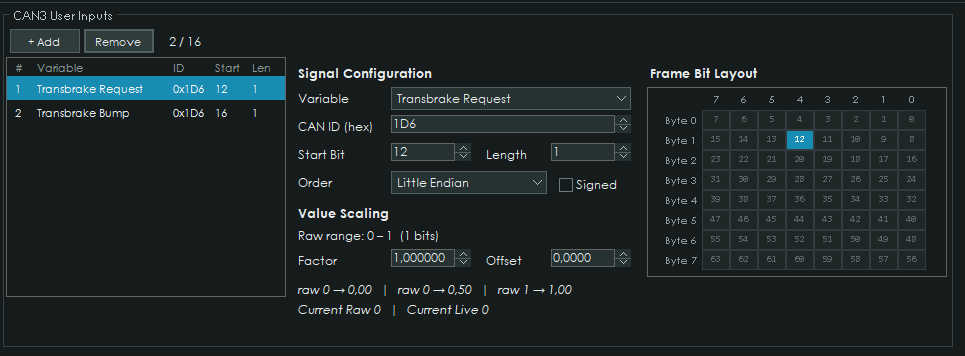
¶ Signal Configuration
For each CAN Input, the following parameters can be configured:
| Setting | Description |
|---|---|
| Variable | CANTCU value controlled by the received signal |
| CAN ID | CAN message identifier |
| Start Bit | First bit of the signal within the CAN frame |
| Length | Signal length from 1 to 32 bits |
| Byte Order | Little Endian or Big Endian |
| Signed | Enables signed value interpretation |
| Factor | Multiplier applied to the received value |
| Offset | Offset applied after scaling |
The final value is calculated as:
Value = Raw × Factor + Offset
¶ Bit Layout
The Frame Bit Layout provides a visual representation of the selected signal inside the 8-byte CAN frame.
Changing the Start Bit, Length or Byte Order updates the highlighted bits automatically.
¶ Scaling
The editor shows the raw value range and a preview of the resulting scaled values.
For example:
Factor = 0.1
Offset = -40
results in:
Value = Raw × 0.1 - 40
This makes it possible to directly reproduce scaling from a CAN/DBC specification.
¶ Live Values
When CANTCU is connected and receiving the configured CAN message, the editor displays:
- Current Raw - extracted CAN value before scaling
- Current Live - value after Factor and Offset are applied
This can be used to verify the configuration without leaving the CAN Input editor.
¶ Available Variables
The Variable dropdown automatically shows all values that can be controlled through a CAN Input.
Available destinations include engine and vehicle data, shifter functions, drive-mode controls, AWD controls and Race+ functions such as:
- Clutch Pedal
- Transbrake Request
- Transbrake Bump
- Converter Unlock Request
- User-Defined Shift Map Active
Only variables supported as CAN Input destinations are shown.