CANTCU provides four Analog Inputs (AIN) and four Digital Inputs (DIN). Each input can be assigned independently from the Inputs configuration page.
¶ Analog Inputs
The following Analog Input modes are available:
- Disabled
- Analog Sensor 0-5V
- Shift Paddles
- AIN to DIN
- E46 Shifter Adapter A1
- E46 Shifter Adapter A2
- Rotary Switch
- User Defined
¶ Analog Sensor 0-5V
Reads a 0-5 V analog signal and converts it to a selected value.
Available outputs include:
- Pedal Position
- Engine MAP
- Generic Sensor
- Clutch Pedal
Clutch Pedal is used as the input for the Race+ Virtual Clutch function.
¶ Shift Paddles
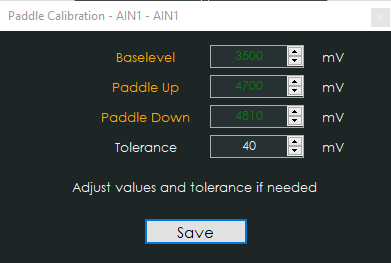
Resistive or voltage-based shift paddles can be connected through an Analog Input.
Calibration of the correct voltage levels is done using the step-by-step calibration wizard.
¶ AIN to DIN
Allows an Analog Input to work as a digital switch.
Trigger voltage and trigger logic can be configured.
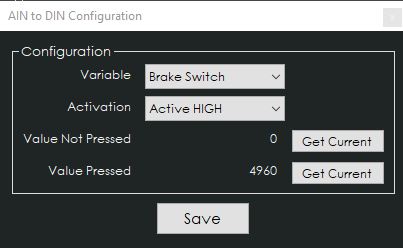
Available functions include:
- Ignition On
- Brake Switch
- Paddle Up / Down
- Shifter Gear Up / Down
- Shifter Mode
- Shifter P / R / N / D
- Kickdown Active
- Launch Control
- Clutch Kick
- User-Defined Shift Map Active
¶ E46 Shifter Adapter
E46 Shifter Adapter A1 and A2 are used with the CANTCU E46 shifter adapter.
Refer to the relevant shifter instructions for the required input assignments.
¶ Rotary Switch
A Rotary Switch can be used to select transmission and shifter functions using up to five voltage positions.
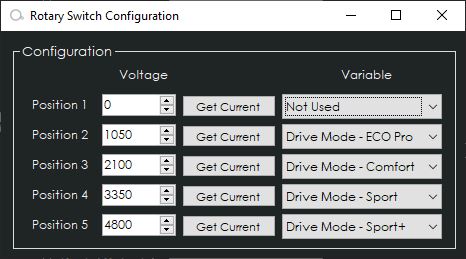
Available functions include:
- Drive Mode ECO Pro / Comfort / Sport / Sport+
- Drive Mode Up / Down
- DriveLogic Mode / Up / Down
- Shifter P / R / N / D
- Shifter Gear Up / Down
- Shifter Mode
- Paddle Up / Down
¶ User Defined
User Defined mode provides a configurable transfer map between the Analog Input voltage and the selected output value.
Available outputs include:
- Pedal Position
- Engine MAP
- Generic Sensor 1-4
- Clutch Pedal
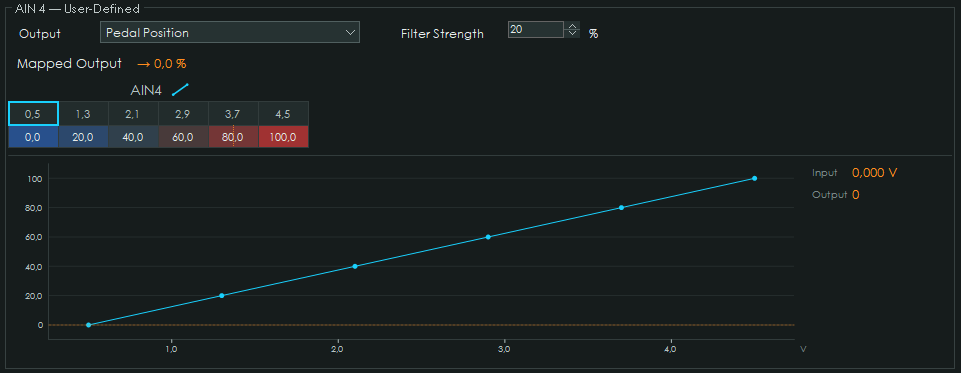
The transfer curve can contain up to 16 points, allowing non-linear sensors or controls to be mapped accurately.
¶ Digital Inputs
Digital Inputs are normally connected to switches that pull the input to Ground.
Trigger logic can be configured as:
- Active Grounded
- Active Open
Functions that support it can additionally be configured as Momentary or Latching.
¶ Available Digital Input Functions
| Name | 8HP | E-DCT | F-DCT | ATC | Description |
|---|---|---|---|---|---|
| Ignition On | X | X | X | X | External ignition-state input |
| Brake Switch | X | X | X | Brake pedal state | |
| Paddle Up | X | X | X | Driver upshift request | |
| Paddle Down | X | X | X | Driver downshift request | |
| Shifter Gear Up | X | X | X | Sequential shifter upshift request | |
| Shifter Gear Down | X | X | X | Sequential shifter downshift request | |
| Shifter Mode Button | X | X | X | Toggles shifter Auto / Manual mode | |
| Shifter Mode Switch | X | X | X | Switch-controlled Auto / Manual mode | |
| Shifter Park Button | X | X | X | Requests Park | |
| Shifter P | X | X | X | Button shifter Park request | |
| Shifter R | X | X | X | Button shifter Reverse request | |
| Shifter N | X | X | X | Button shifter Neutral request | |
| Shifter D | X | X | X | Button shifter Drive request | |
| Drive Mode Up | X | Moves one step toward a sportier drive mode | |||
| Drive Mode Down | X | Moves one step toward a more comfortable drive mode | |||
| Drive Mode ECO Pro | X | Selects ECO Pro | |||
| Drive Mode Comfort | X | Selects Comfort | |||
| Drive Mode Sport | X | Selects Sport | |||
| Drive Mode Sport+ | X | Selects Sport+ | |||
| DriveLogic Mode Button | X | Changes DriveLogic mode | |||
| DriveLogic Mode Up | X | Increases DriveLogic mode | |||
| DriveLogic Mode Down | X | Decreases DriveLogic mode | |||
| Launch Control | X | X | Launch Control request | ||
| Drag Shift Mode | X | X | X | Activates Drag Shift Mode | |
| Kickdown Active | X | X | X | External kickdown request | |
| Clutch Kick | X | X | Clutch Kick request | ||
| E36 Shifter L2 | X | X | X | E36 shifter input | |
| E36 Shifter L4 | X | X | X | E36 shifter input | |
| External Output | X | X | X | Input state available for CAN / output use | |
| Keypad Illumination On | X | X | X | X | Enables or disables CANTCU Keypad illumination |
| Keypad Dim | X | X | X | X | Adjusts CANTCU Keypad illumination brightness |
| Start New Log | X | X | X | X | Starts a new internal log |
| AWD Force RWD | X | Forces AWD request to 0% | |||
| AWD Force AWD | X | Forces AWD request to 100% | |||
| Transbrake Request | Race+ | Activates the Race+ Transbrake | |||
| Transbrake Bump | Race+ | Activates the Race+ Bump function | |||
| Converter Unlock Request | Race+ | Forces torque converter unlock | |||
| User-Defined Shift Map Active | Race+ | Activates the Race+ User-Defined Shift Map |
Some functions are only shown when the corresponding transmission, Race+ software or accessory is configured.