CANTCU Configurator automatically checks the connected CANTCU firmware version.
If the firmware and PC software versions do not match, you will be prompted to update.
The updater can also be opened manually from:
Options → Manual Firmware Update
Only update firmware while the vehicle is stationary and the engine is off.
¶ Firmware Updater
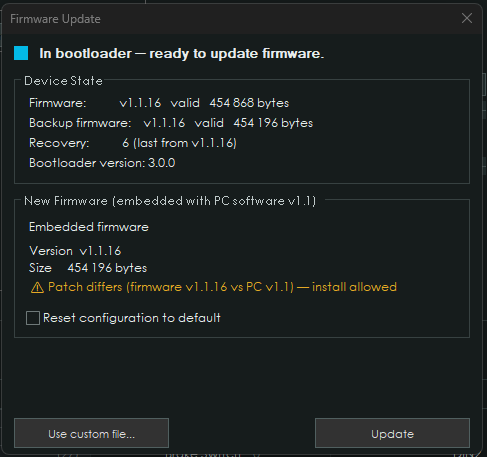
The updater shows:
- Current firmware
- Backup firmware
- Recovery information
- Bootloader version
- Firmware included with the PC software
The normal update uses the firmware bundled with the installed CANTCU Configurator version.
Press Update and follow the on-screen instructions.
Do not disconnect CANTCU or remove power during the update.
After a successful update, CANTCU reboots and reconnects automatically.
¶ Reset Configuration
Enable Reset configuration to default only when you also want to clear the existing CANTCU configuration.
Normally this should remain unchecked.
¶ Custom Firmware
If CANformance support provides a custom or test firmware file, select:
Use custom file...
The updater accepts compatible .bin and .TCUbin firmware files.
The firmware version is checked before installation. Incompatible major/minor firmware versions cannot be installed.
¶ Older Devices
Older CANTCU units may require a bootloader update before installing current firmware.
The Firmware Updater detects this automatically and performs the required bootloader and firmware update steps in the same process.
No separate updater is required.