The CANTCU Configurator provides access to configuration, diagnostics and realtime data from the main interface.
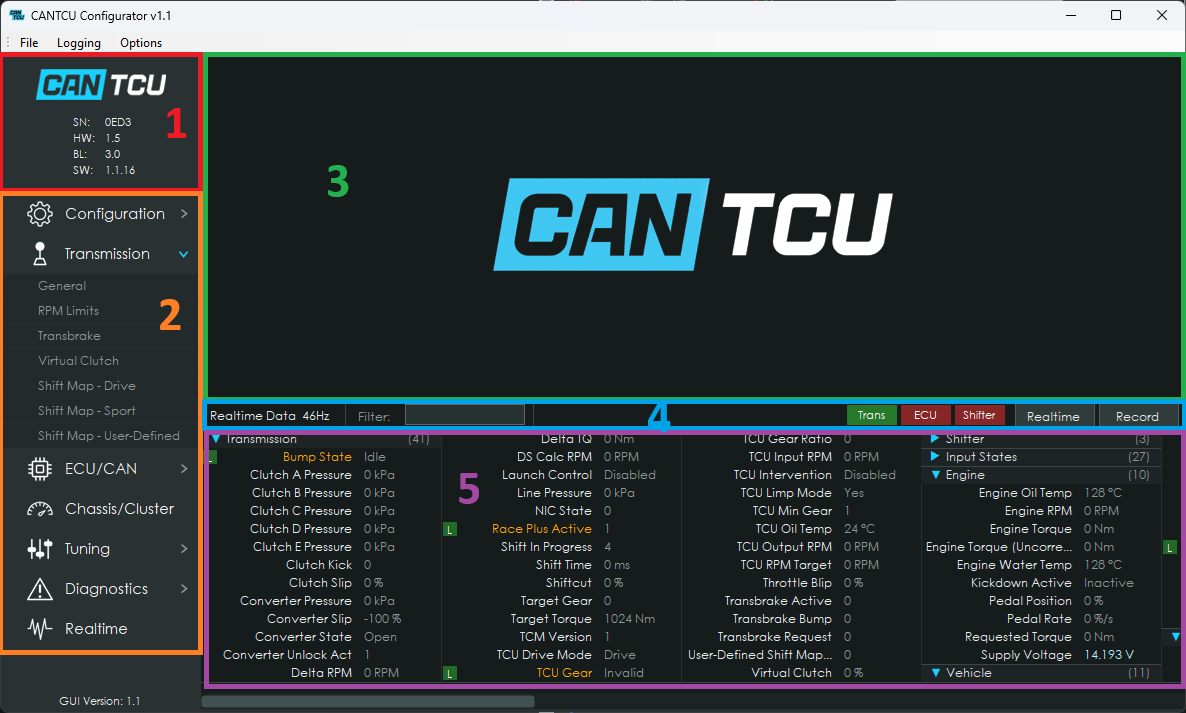
The main interface consists of:
- CANTCU information and connection status
- Section navigation
- Main content area
- Device/CAN-bus indicators and graph/datalogging controls
- Realtime values
¶ Graph & Gauges
The Realtime section can display live values from CANTCU, the ECU and transmission as graphs and gauges.
- Click a realtime value to add it to the graph.
- Left-click adds the value on the main graph axis, right-click adds a secondary axis.
- Click a gauge to change the value/scaling and gauge type displayed by that gauge.
- Presets can be added/removed from the upper preset bar.
- Extra settings for graphs like saving an image or positioning the legend can be found by right-clicking the graph area.
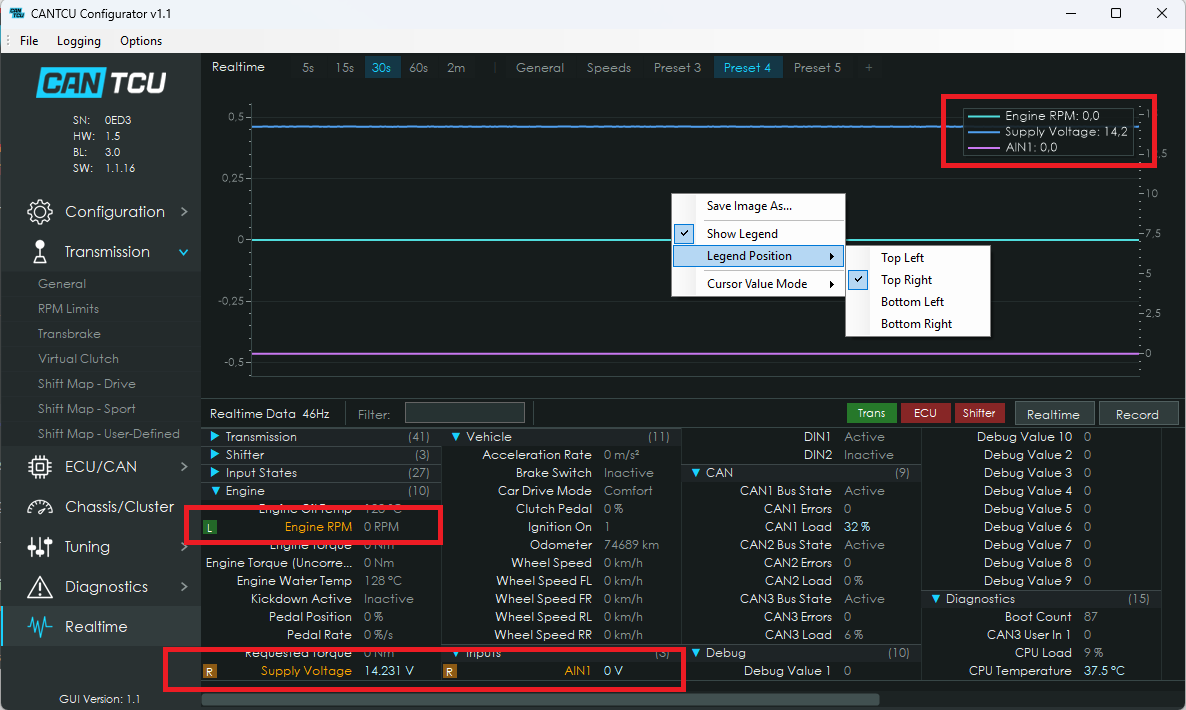
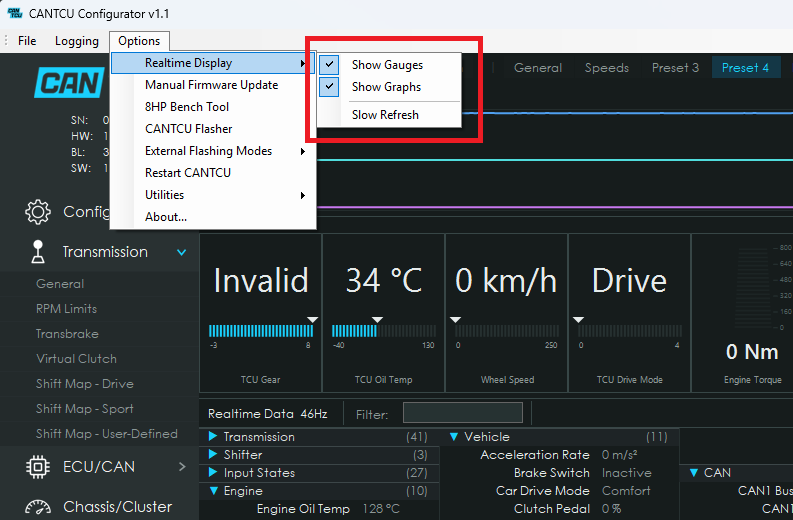
Graphs and gauges can be displayed separately or together.
A slower refresh mode is also available for older or slower computers.
¶ Indicators
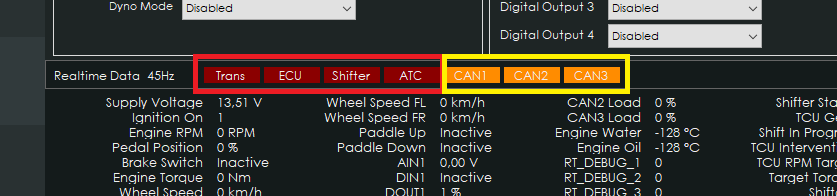
Device indicators show the communication status of connected devices.
- Green = connected
- Red = not connected
CAN-bus indicators appear when a physical communication problem is detected on the corresponding CAN bus. Typical causes include incorrect CAN speed or wiring problems.
CAN-bus indicators remain hidden when no problem is detected.
¶ Realtime Values
Realtime values can be viewed, graphed and logged through the CANTCU Configurator.
| Name | Unit | Description | Source |
|---|---|---|---|
| Supply Voltage | V | CANTCU supply voltage | Internal |
| Engine RPM | RPM | Engine speed | Car |
| TPS Value | % | Throttle position | Car |
| Engine Torque | Nm | Actual engine torque | Car |
| Brake Switch | 0/1 | Brake switch state | Car / DIN |
| Wheel Speed | km/h | Average wheel speed | Car |
| Wheel Speed HL | km/h | Rear-left wheel speed | Car |
| Wheel Speed HR | km/h | Rear-right wheel speed | Car |
| Wheel Speed VL | km/h | Front-left wheel speed | Car |
| Wheel Speed VR | km/h | Front-right wheel speed | Car |
| Paddle Up | 0/1 | Upshift paddle state | Car / DIN |
| Paddle Down | 0/1 | Downshift paddle state | Car / DIN |
| AIN1 | V | Analog Input 1 voltage | Internal |
| AIN2 | V | Analog Input 2 voltage | Internal |
| AIN3 | V | Analog Input 3 voltage | Internal |
| AIN4 | V | Analog Input 4 voltage | Internal |
| DIN1 | 0/1 | Digital Input 1 state | Internal |
| DIN2 | 0/1 | Digital Input 2 state | Internal |
| DIN3 | 0/1 | Digital Input 3 state | Internal |
| DIN4 | 0/1 | Digital Input 4 state | Internal |
| DOUT1 | 0/1 | Digital Output 1 state | Internal |
| DOUT2 | 0/1 | Digital Output 2 state | Internal |
| DOUT3 | 0/1 | Digital Output 3 state | Internal |
| DOUT4 | 0/1 | Digital Output 4 state | Internal |
| CAN1 Load | % | CAN1 bus load | Internal |
| CAN2 Load | % | CAN2 bus load | Internal |
| CAN3 Load | % | CAN3 bus load | Internal |
| Engine MAP | kPa | Engine manifold pressure | Car |
| Shifter Status | Shifter position | Transmission | |
| Shift In Progress | 0/1 | Indicates an active shift | Transmission |
| Shift Requested | 0/1/2 | None / Downshift / Upshift | Transmission |
| TCU Gear | Current transmission gear | Transmission | |
| TCU Oil Temp | °C | Transmission oil temperature | Transmission |
| TCU DL Mode | Drivelogic / selector mode | Transmission | |
| DS Calc RPM | RPM | Calculated driveshaft speed | Internal |
| TCU Input RPM | RPM | Transmission input speed | Transmission |
| TCU Output RPM | RPM | Transmission output speed | Transmission |
| TCU Gear Ratio | Current transmission gear ratio | Transmission | |
| TCU Intervention | 0/1/2 | None / Blip / Cut request | Transmission |
| Target Torque | Nm | Requested engine torque | Transmission |
| Shift Time | ms | Last shift duration | Transmission |
| TCU Drive Mode | Current transmission drive mode | Transmission | |
| Shiftcut | % | Requested torque-cut amount | Transmission |
| Throttle Blip | % | Requested throttle-blip amount | Transmission |
| TC Status | 0/1/2 | Open / Slipping / Locked | Transmission |
| Clutch Slip | % | Clutch slip percentage | Transmission |
| Converter Slip | % | Torque converter slip percentage | Transmission |
| LC Enabled | 0/1 | Launch Control enabled | Car / DIN |
| LC Active | 0/1 | Launch Control active | Transmission |
Race+ adds additional transmission-specific realtime values.