Race+ configuration is found under Transmission in CANTCU Configurator.
Race+ settings are adjusted live while connected to the vehicle. Changes to supported transmission behaviour do not require reflashing the TCM.
¶ General

¶ Gear limits
- Minimum Gear sets the lowest gear that can be used.
- Maximum Gear sets the highest gear that can be used.
- Disable automatic downshift in Manual mode prevents automatic downshifts while driving in Manual mode.
¶ Torque Converter Lockup
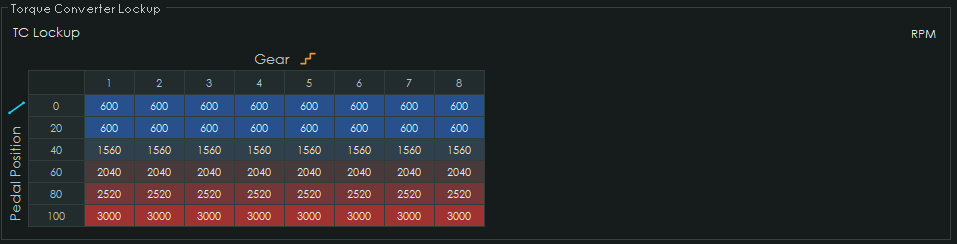
The Torque Converter Lockup map sets the minimum RPM at which converter lockup is allowed. A user-definable 2D or 3D map with freely selectable axes can be used.
Allowing the converter to unlock at low RPM can help bring the engine into its useful powerband or improve turbo spool during low-RPM transitions.
¶ Neutral Idle Control
Neutral Idle Control enables or disables the Neutral Idle Clutch function. When active, the transmission decouples while stationary in 1st or 2nd gear, removing converter push.
This is especially useful with high or irregular idle RPM. The transmission re-engages smoothly when the brake is released.

¶ RPM Limits

RPM Limits define the upshift and downshift RPM limits used by CANTCU-controlled shifting.
Important: Set Max RPM and Downshift RPM to the same values used when Race+ was flashed with the 8HP TCM Tool. Incorrect values may cause unexpected shifting behaviour.
¶ Transbrake + Bump
Warning: Transbrake and Bump are racing functions and should only be used in a controlled environment with sufficient clear space around the vehicle. An unintended release can cause the vehicle to move or launch immediately. Never use these functions where an unexpected vehicle movement could result in a collision, injury or property damage.

The Transbrake can be activated while the transmission is in 1st or 2nd gear, the brake is held and the vehicle is stationary.
¶ Activation
Transbrake Activation Source selects how the Transbrake and Bump functions are controlled:
- Input Activated uses the normal CANTCU input configuration. Assign the Transbrake and Bump functions to suitable digital, analog or CAN inputs.
- Shifter Activated uses supported buttons or lever movements on the selected shifter. No additional input is required.
- Paddle Activated uses both shift paddles to control Transbrake and Bump.
Paddle Activated is independent of the selected shifter and can be used wherever CANTCU receives two independent paddle inputs.
Shifter and Paddle activation only modify the controls while Race+ is active. Normal shifter and paddle operation is unchanged when Race+ is not active.
¶ Paddle Activated
Paddle Activated allows the complete Transbrake and Bump sequence to be controlled from the shift paddles:
- Pull and hold both paddles to activate the Transbrake.
- Once the Transbrake is active, release either paddle while continuing to hold the other.
- The paddle still being held now keeps the Transbrake active.
- The released paddle becomes the Bump control. Pull and release it to perform a bump.
- Repeat the Bump paddle as many times as required while continuing to hold the Transbrake paddle.
- When ready to launch, release the paddle that is still being held. The Transbrake releases immediately.
While Paddle Activated is in use, these paddle movements are consumed by the Transbrake function and do not trigger normal gear shifts.
Both paddle inputs must be available independently to CANTCU. When using analog paddle inputs, complete the paddle calibration including the Both Paddles position.
¶ Supported Shifters for Transbrake + Bump activation
| Shifter | Transbrake activation | Bump |
|---|---|---|
| BMW 8HP | Hold Park | Separate Input |
| BMW E6/7x LCI / E8/9x DCT & E9x M3 DCT | Hold Park | Unlock button |
| BMW Fxx DCT | Hold lever - (up) | Separate Input |
| BMW F/G-Series 8HP, F90 M5 & Toyota A90 Supra | Hold Park | Separate Input |
| BMW E46 M3 SMG | Hold lever - (up) | Separate Input |
| Land Rover L494 / X540 | Hold Park | Separate Input |
| Dodge Stick / Charger Column | Hold Park | Separate Input |
| Iveco 8AS 6thGen | Hold Park | Separate Input |
| Keypads & Universal Shifter | Use Input Activated | Separate Input |
For Park-activated shifters, release the Park button to launch. Normal Park operation is temporarily inhibited after the Transbrake is released to prevent an accidental Park request.
For the BMW Fxx DCT and BMW E46 SMG shifters, a short - movement remains a normal downshift. Hold - for approximately 700 ms to activate the Transbrake.
¶ Bump
- Bump target pressure sets the clutch pressure used during a bump.
- Bump hold time sets how long the target pressure is held.
Start with a near-zero target pressure and a short hold time. Increase the hold time until the desired bump distance is achieved. Bump aggressiveness will vary depending on the load on the transmission.
Transbrake Active and Bump State realtime values can be used for monitoring or as dash indicators.
¶ Virtual Clutch

Virtual Clutch controls the B clutch through an analog or CAN input configured as Clutch Pedal.
- Engagement point sets the pressure point at which the clutch starts to grab.
- Scaling adjusts the pressure range controlled by the 0–100% clutch pedal input.
Use the Clutch Pedal % realtime value when setting up and testing the Virtual Clutch. A smaller Scaling value provides finer pressure modulation over a smaller range.
¶ Shift Maps
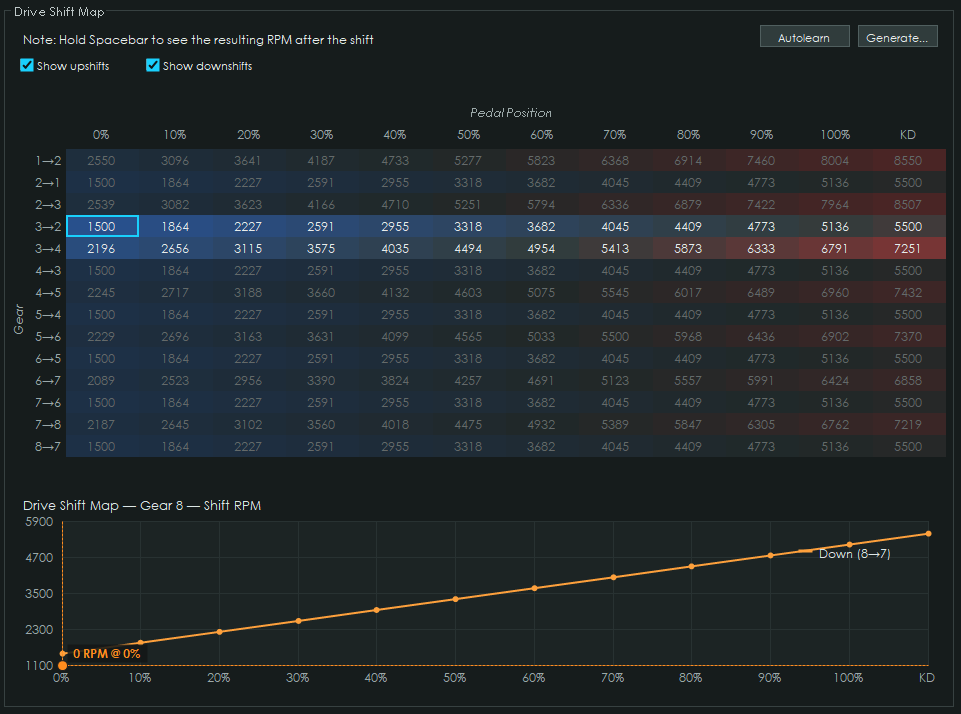
The Drive and Sport Shift Maps define automatic upshift and downshift points when Drive or Sport mode is active. Shift points can be edited directly in the table or generated using the Generate function.
The Autolearn function can also create shift points while driving in Manual mode. Trigger the shift at the desired RPM and the shift point is added to the map, where it can be confirmed or discarded.
¶ Shift Map - User-Defined
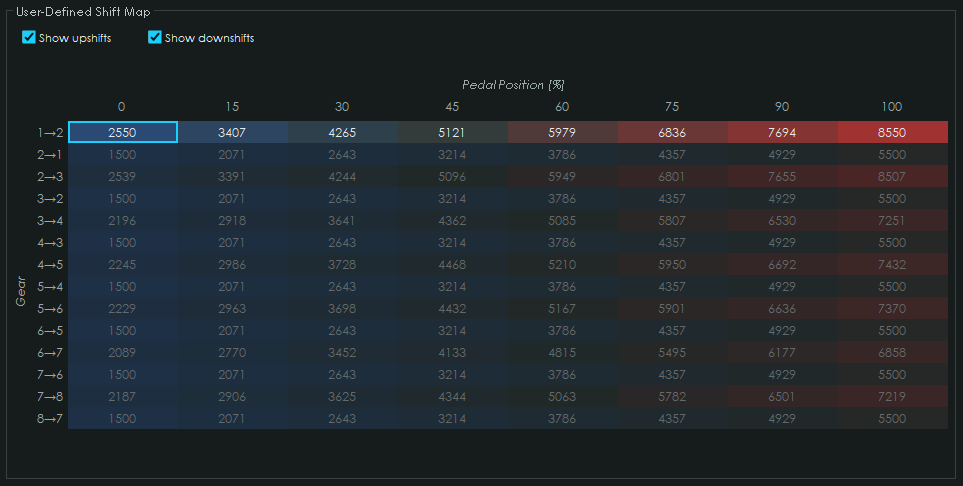
The User-Defined Shift Map provides an additional shift map activated through the User-Defined Shift Map Active input.
When active, it overrides the Drive and Sport shift maps as well as Manual mode. The X-axis can be configured to use a suitable realtime value.