CANTCU supports both PC logging and internal logging.
Logs are saved in .TCUlog format and can be opened directly with the built-in Datalog Viewer.
¶ PC Logging
PC logging records realtime data while CANTCU Configurator is connected through USB.
¶ Start a Log
Open the Realtime page and press Record.
Choose the file location and filename. Logging starts immediately after the file is created.
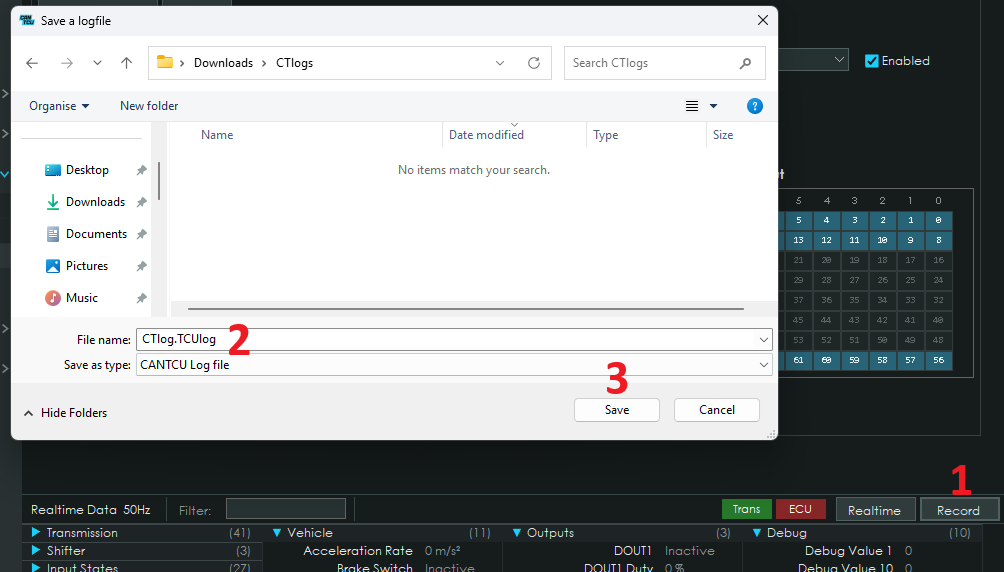
The log also contains CANTCU and configuration information to make later analysis easier.
¶ Marker
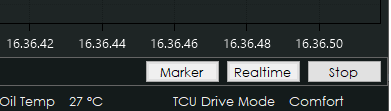
While recording, a Marker button is available.
Press Marker to mark an interesting section of the log. Marked sections are highlighted in the Datalog Viewer.
¶ Stop Logging
Press Stop to finish and save the log.
The .TCUlog file can then be opened in the Datalog Viewer.
¶ Internal Logging
CANTCU hardware revision 1.6 and newer can record logs internally without a PC connected.
¶ Configure Logger
Open:
Logging → Configure Logger
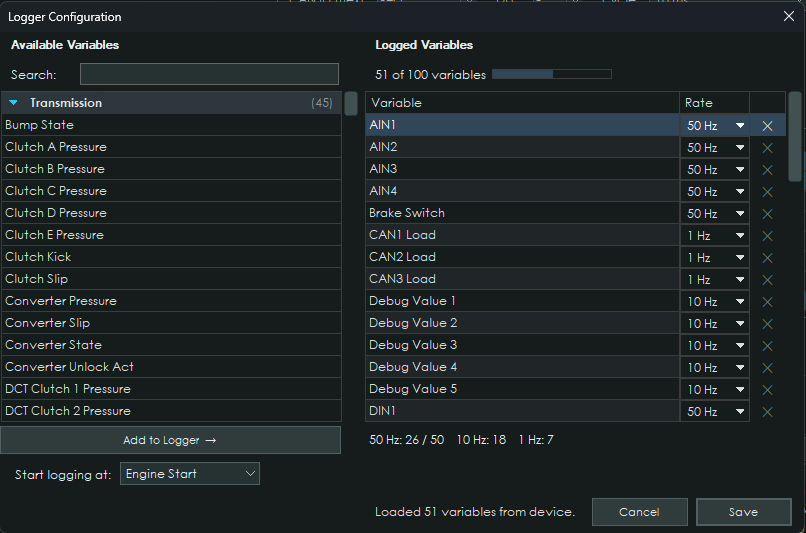
Up to 100 realtime values can be selected.
Each value can be logged at:
- 50 Hz
- 10 Hz
- 1 Hz
A maximum of 50 values can be logged at 50 Hz.
Logging can start automatically at:
- Power Up
- Ignition On
- Engine Start
- Input Triggered
For Input Triggered logging, configure an input as Start New Log.
¶ Download Logs
With CANTCU (HW1.7 onwards) connected, open:
Logging → Download Logs
Recorded sessions show the trigger reason, duration, record count and file size.
You can:
- Download the selected log
- Download all logs
- Delete all stored logs
Downloaded logs are saved as .TCUlog files and can be opened directly in the Datalog Viewer.
Internal logs cannot be downloaded while the engine is running.